
PS5 Disc Drive Complete Guide
Everything you need to know about the PlayStation 5 disc drive including technical specifications, common issues, troubleshooting steps, maintenance tips, and replacement options.
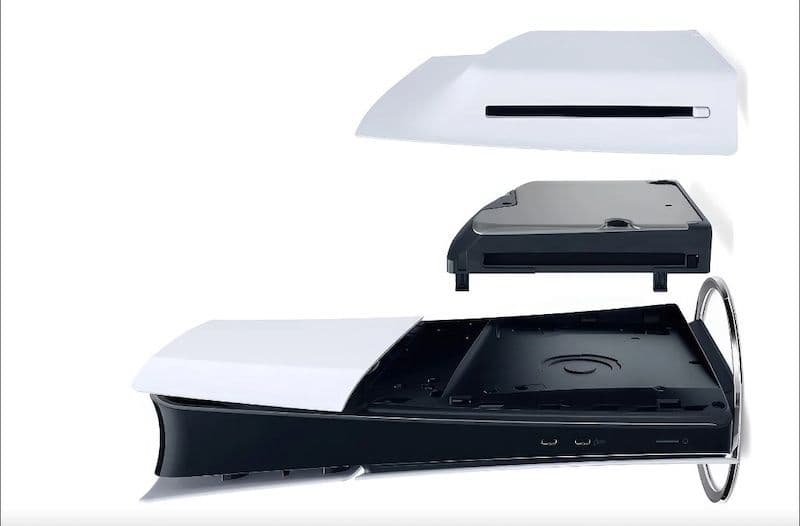
Technical Specifications
Supported Disc Types
- PS5 Game Discs: Region-free, up to 100GB capacity
- PS4 Game Discs: Full backward compatibility
- Ultra HD Blu-ray: 4K movies with HDR support
- Standard Blu-ray: 1080p movies and content
- DVD: Standard definition movies and media
- CD/Audio CD: Not supported on PS5
Common Disc Drive Issues
1. Disc Not Reading or Ejecting
The PS5 won't accept discs, ejects them immediately, or displays "Unrecognized Disc" errors.
Possible Causes:
- • Dirty or scratched disc surface
- • Dust or debris inside the drive
- • Incorrect disc orientation (label side down)
- • Firmware bug or software glitch
- • Hardware failure or misaligned laser
2. Loud Grinding or Clicking Noises
The disc drive makes unusual mechanical sounds during operation.
Possible Causes:
- • Foreign object stuck in the drive
- • Worn or damaged drive mechanism
- • Loose internal components
- • Disc not properly seated on spindle
3. Error Code CE-100005-6
Specific error indicating the disc drive cannot read the inserted media.
Possible Causes:
- • Damaged or incompatible disc
- • Region-locked Blu-ray movie (games are region-free)
- • Drive lens needs cleaning
- • Hardware malfunction
4. Disc Stuck in Drive
Unable to eject a disc using the normal eject button.
Possible Causes:
- • Power failure during disc operation
- • Mechanical jam or obstruction
- • Software crash while disc was spinning
- • Drive motor failure
Troubleshooting Guide
1Clean the Disc
Dirty or smudged discs are the most common cause of read errors.
- Use a soft, lint-free microfiber cloth
- Wipe from the center outward in straight lines (never in circles)
- For stubborn marks, use isopropyl alcohol (70% or higher)
- Let the disc dry completely before inserting
2Restart Your PS5
A full power cycle can resolve software-related disc drive issues.
- Turn off the PS5 completely (not Rest Mode)
- Unplug the power cable for 3-5 minutes
- Plug back in and power on
- Try inserting the disc again
3Update System Software
Sony regularly releases firmware updates that fix disc drive bugs.
- Go to Settings → System → System Software → System Software Update and Settings
- Select "Update System Software"
- Allow the update to download and install
- Restart and test the disc drive
4Manual Disc Eject (If Stuck)
Use the manual eject screw if a disc is stuck and won't eject normally.
- Turn off and unplug your PS5
- Remove the base and side panels
- Locate the manual eject hole near the disc drive
- Insert a screwdriver and turn clockwise until the disc ejects
5Rebuild Database
Rebuilding the database can fix corrupted system files affecting the disc drive.
- Turn off the PS5 completely
- Hold the power button until you hear a second beep (~7 seconds)
- Connect controller via USB and press PS button
- Select "Rebuild Database" from Safe Mode menu
Maintenance & Care Tips
Keep Your Console Clean
Dust buildup can affect disc drive performance. Clean the exterior regularly and ensure proper ventilation around the console.
Handle Discs Properly
Always hold discs by the edges, never touch the data surface. Store discs in their cases when not in use to prevent scratches and dust accumulation.
Avoid Frequent Disc Swapping
Excessive disc insertion and removal can wear down the drive mechanism. Consider digital downloads for games you play frequently.
Position Console Correctly
Whether vertical or horizontal, ensure the PS5 is on a stable, level surface. Vibrations or tilting during disc operation can cause read errors.
Don't Force Discs
If a disc doesn't insert smoothly, don't force it. Check for obstructions and ensure you're inserting it label-side up with the console horizontal (or to the left when vertical).
Keep Firmware Updated
Enable automatic system updates to ensure you have the latest disc drive firmware and bug fixes from Sony.
Best Compatible M.2 SSDs for PS5
PS5 SSD Requirements
PS5 requires PCIe Gen4 M.2 NVMe SSDs with minimum 5,500 MB/s read speed. Must be 2280 form factor with heatsink (max 11.25mm height).
Samsung 990 Pro
Best Overall Performance
Depending on size
WD Black SN850X
Best Value for Performance
Depending on size
Crucial P5 Plus
Best Budget Option
Depending on size
Seagate FireCuda 530
High Endurance Option
Depending on size
Installation Tips
- • Always purchase the heatsink version or buy a compatible heatsink separately
- • Ensure the total height with heatsink does not exceed 11.25mm
- • Update PS5 system software before installing the SSD
- • Format the drive through PS5 settings after installation
- • 1TB minimum recommended for adequate game storage
Replacement Options
Official Sony Disc Drive
For Digital Edition & Slim
Professional Repair Service
For Original PS5
Important Notes
- • The detachable disc drive only works with PS5 Digital Edition and PS5 Slim models
- • Original PS5 (disc version) requires internal drive replacement by a professional
- • Opening your PS5 yourself will void the warranty
- • The detachable drive requires a one-time internet connection for pairing
- • Check if your console is still under warranty before purchasing a replacement
Frequently Asked Questions
Can I add a disc drive to my PS5 Digital Edition?
Yes! Sony released an official detachable disc drive that works with the PS5 Digital Edition and PS5 Slim models. The drive connects via USB-C and costs $79.99. It requires a one-time internet connection to pair with your console. Note that this drive does NOT work with the original PS5 disc edition.
Why won't my PS5 read discs?
Common causes include dirty or scratched discs, dust in the drive, incorrect disc orientation (label should face up when horizontal), firmware bugs, or hardware failure. Start by cleaning the disc with a microfiber cloth, restarting your PS5, and updating the system software. If the problem persists across multiple discs, the drive may need professional repair.
Is the PS5 disc drive region-free?
Yes, PS5 game discs are completely region-free and will work on any PS5 console worldwide. However, Blu-ray movies are region-locked (Region A for Americas/Asia, Region B for Europe/Africa, Region C for Asia). DVDs are also region-locked. Only game discs are region-free.
How much does a PS5 disc drive replacement cost?
The official Sony detachable disc drive for PS5 Digital Edition and Slim models retails for $79.99. For the original PS5 disc edition, internal drive replacement requires professional service and typically costs $150-$250 depending on the repair center. If your console is still under warranty, Sony may repair it for free.
Can I replace the PS5 disc drive myself?
For PS5 Slim and Digital Edition, yes - the detachable drive is designed for easy user installation via USB-C with no tools required. For the original PS5 disc edition, replacing the internal drive requires disassembly, technical expertise, and will void your warranty. It's recommended to use Sony's official repair service or a certified technician for internal drive replacement.
Does the PS5 play 4K Blu-rays?
Yes, the PS5 disc drive is an Ultra HD Blu-ray drive that supports 4K UHD Blu-ray discs with HDR10 and Dolby Vision. It can play movies at up to 3840×2160 resolution (4K). It also supports standard Blu-ray discs (1080p) and DVDs. Note that it does NOT support audio CDs or CD-ROMs.
What does error code CE-100005-6 mean?
Error CE-100005-6 indicates the PS5 disc drive cannot read the inserted disc. This can be caused by a damaged or incompatible disc, region-locked Blu-ray movie (games are region-free), dirty drive lens, or hardware malfunction. Try cleaning the disc, testing with a different disc, and restarting your console. If the error persists, the drive may need repair.
How do I manually eject a stuck disc from PS5?
First, try the software eject: turn off the PS5, unplug it for 3 minutes, plug it back in, and try ejecting. If that doesn't work, you'll need to use the manual eject screw. Turn off and unplug the console, remove the base and side panels, locate the manual eject hole near the disc drive, and insert a screwdriver to turn clockwise until the disc ejects. Consult your PS5 manual for the exact location.
Can I play PS4 discs on PS5?
Yes, the PS5 disc drive has full backward compatibility with PS4 game discs. Simply insert the PS4 disc and the game will install and run on your PS5, often with improved performance (faster load times, higher frame rates). Note that PS3, PS2, and PS1 discs are NOT compatible with PS5.
Why is my PS5 disc drive so loud?
Some noise during disc operation is normal, especially during initial disc reading and installation. However, excessive grinding, clicking, or buzzing sounds may indicate a problem. Causes include a foreign object in the drive, worn mechanism, loose components, or an improperly seated disc. If the noise is excessive or accompanied by read errors, contact Sony support.