
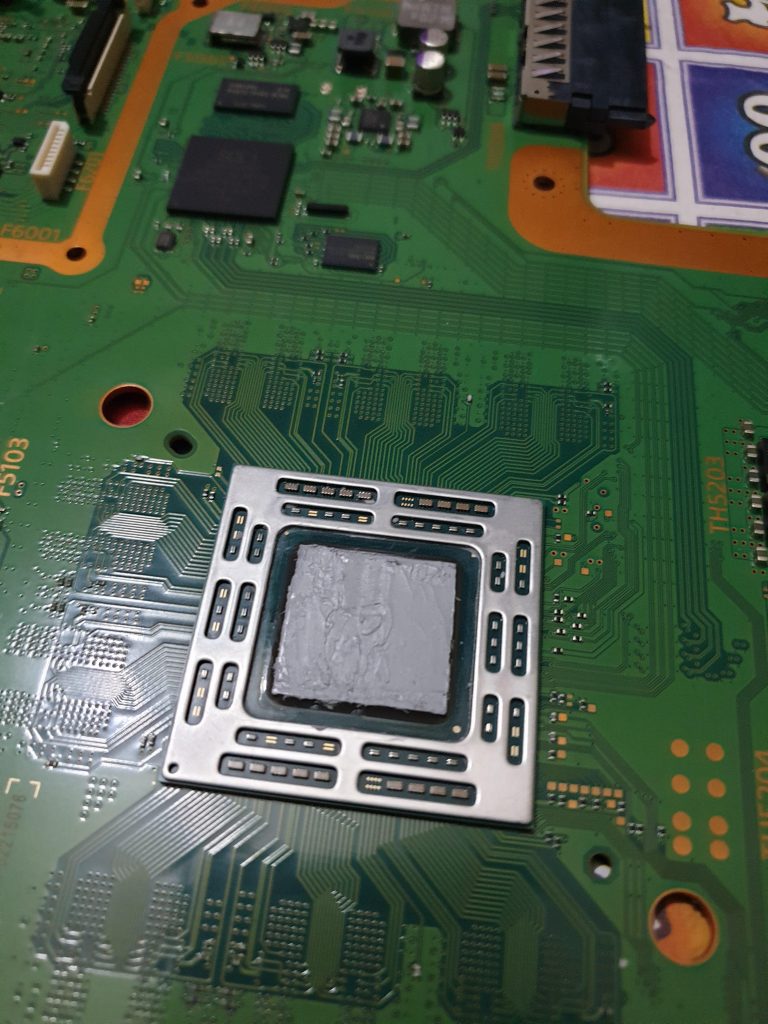
One of the most common problems that can affect the PS4 is overheating. The console has good circulation and heat sink technology, especially if you’re using the PS4 Pro or the newer Slim model, but they can still be prone to getting too hot, and this could cause serious damage to your components. If you’ve ever heard your PS4’s fans whirring away when they’re trying to cool the console down, then you might already have experienced this issue.
One of the components that it’s definitely worth protecting within the PS4 is the processor. This is, in essence, the chip that controls everything; without a processor, the PS4 can’t play games or do anything else, so you need to make sure the processor is kept cool. This is done through the application of thermal paste, but over time, the thermal paste can wear away, so it can be a good idea to replace it. Here’s our guide on how to replace the PS4 thermal paste you’re using for your processor.
What does thermal paste do?
First, let’s take a look at why PS4 thermal paste application is important in the first place. Thermal paste transfers heat from your processor towards a heat sink, meaning that you can divert the heat away from important components and stop them from overheating. The paste seals the gap between your processor and your heat sink, meaning heat can’t escape and is instead channeled into the heat sink. It should, therefore, be obvious why you need thermal paste if you want to make sure your PS4 doesn’t overheat.
Do I need thermal paste?
If your PS4 is relatively new and it’s started overheating, then thermal paste might not be the solution. It’s probably a good idea to send the PS4 off to Sony if it’s faulty, especially if it’s within warranty. Changing your PS4 thermal paste will void your warranty because you’ll need to remove the warranty void stickers on the back of the console, so only do this if you’ve exhausted other options or if your console is old enough that you don’t need to worry about the manufacturer warranty anymore.
How to change the PS4 thermal paste
Alright, let’s get into it. Here’s what you’ll need to do in order to change your PS4’s thermal paste.
- Open up your PS4. This is usually done by removing the bottom plate on the PS4, then removing various other components until you get to the processor. It’s best to watch a video on how to do this, because describing it doesn’t really come close to accurately representing the process. This video does a great job of explaining the method, and you can also use this great visual guide to help you.
- Scrape any dry thermal paste from your processor. If your processor already has thermal paste on it and it’s dried out, make sure to scrape that thermal paste off the surface. Do so carefully; you don’t want to cause any damage to your console’s components, after all. Use tissue paper, but don’t use a wet cloth, because you could damage the console.
- Apply the new thermal paste. Taking the tube of thermal paste you have, apply a small amount to the centre of the processor. Don’t apply too much; a pea-sized blob should be enough. Once the blob has been applied, spread it across the processor, making sure to do so evenly.
- Replace the PS4’s components. Make sure to carefully replace every single component of the PS4 that you removed while you were going through the disassembly process. If you miss anything at all, it could result in operational issues for the console, so don’t skimp on the detail!
What brand of thermal paste should I use?
Many gamers swear by different PS4 thermal paste brands. This guide recommends the Noctua NT-H1 paste, which is an award-winning option Noctua uses for its CPU cooler range. It’s a long-lasting option that should keep your console cool for many years. Alternatively, Arctic’s MX-4 is a mainstay for computer enthusiasts due to its ease of use and high quality, and the Arctic Silver 5 is also a great option.
The important thing here is not to skimp on cost simply because you want to save money. Thermal paste is usually relatively inexpensive, so even if you’re paying a little more for the paste, you won’t be paying as much as you would if you needed to replace or repair your console. Go for a well-known, recognised, and trusted brand, because if you don’t, you may end up regretting it further down the line.
What if thermal paste doesn’t fix the problem?
If thermal paste isn’t fixing the problem with your PS4, then it may be an issue with another component. The heat sink may be to blame, especially if your console is still overheating after applying thermal paste. There could also be any number of other faults, and if you’re not able to diagnose and address them yourself, then it’s a good idea to send your console to a professional repair shop to have it looked at. You may also want to contact Sony, although if you’ve applied new thermal paste, your console will almost definitely be out of warranty. Still, they may repair it for a certain price, so contact them and ask if there’s anything they’re willing to do. You never know until you try!